Alter puts AI inside your clipboard. Press ⌥ Space in any macOS app, type a command in plain English, and the transformed text pastes back — before you'd have even found the ChatGPT tab.
psst — ⌥ + Space works on this page too. Try it.
hey just following up on the deck, lmk if u had a chance to look, kinda need it by EOD thx
You run this loop 30+ times a day.
~30 seconds · 8 steps · flow: broken
⌥ Space → Done.
One keystroke. ~1.5 seconds. You never left the app. Keep scrolling — it gets better.
Small app. Sharp edges.
A bar that respects your flow
540 × 210 px. Appears on top of any app. Vanishes when you're done. No window to manage, no Dock icon to babysit.
8 one-click moves — or type whatever
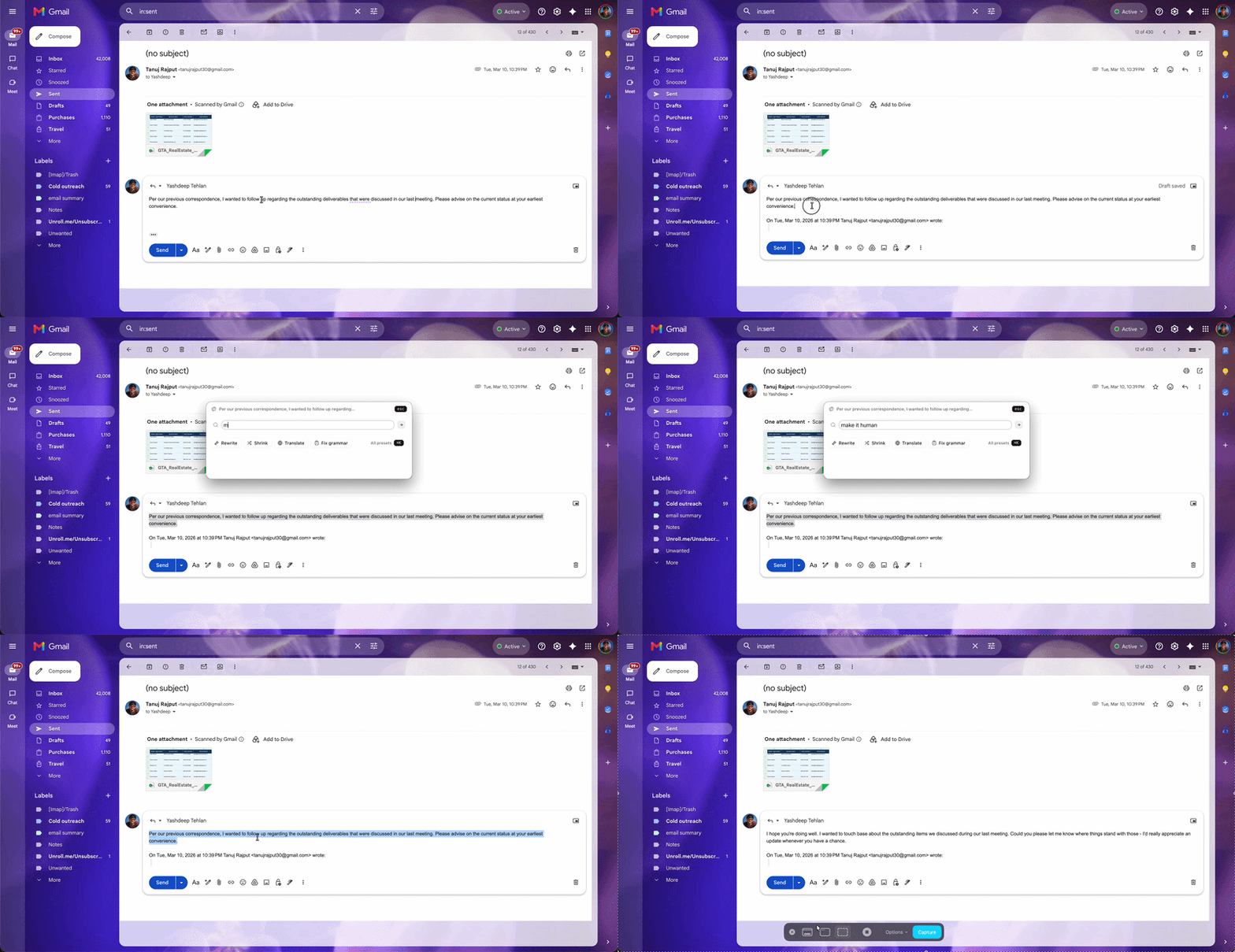
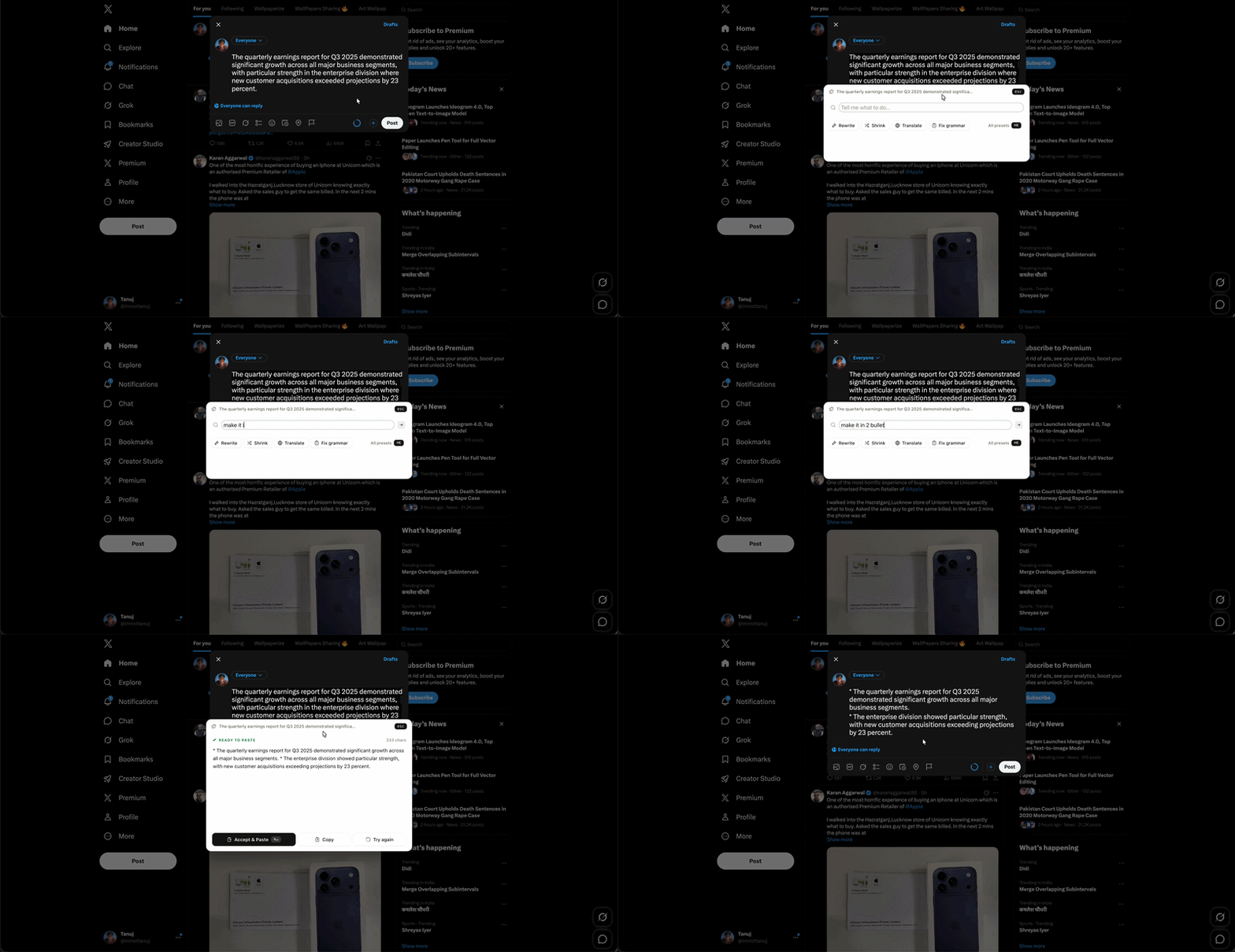
Anything you'd type into ChatGPT. "Make this a bulleted list." "Rewrite as a tweet." "Extract the action items."
Under two seconds, every time
Powered by Groq's llama-3.3-70b-versatile, with auto-fallback to llama3-8b if the primary model burps.
A home for everything else
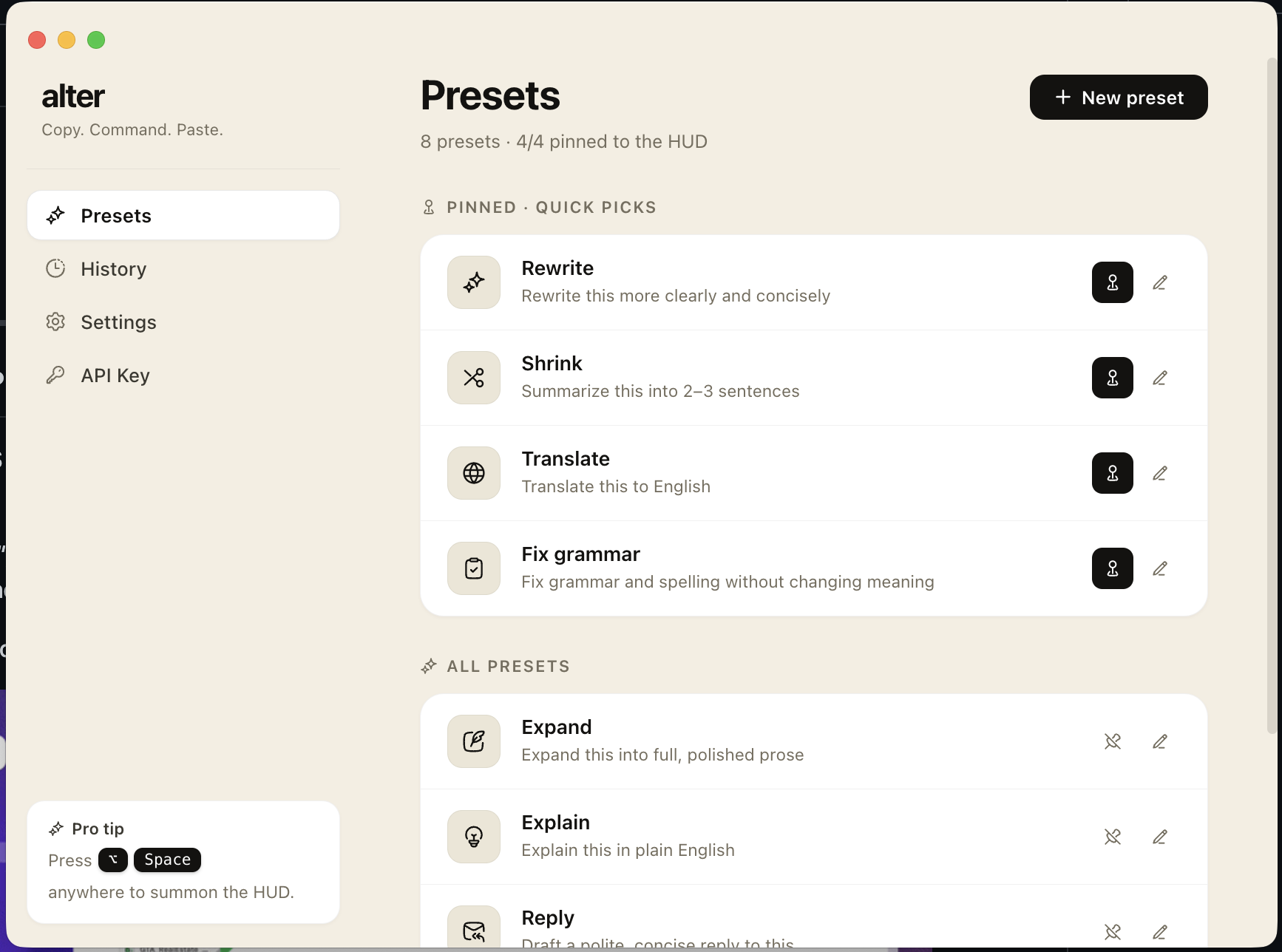
Manage presets, browse transform history, change the hotkey, swap your API key — all from the menu bar.
Your key, your machine
API key encrypted via macOS Keychain (safeStorage). No account, no telemetry, no remote logging — ever.
Zero Dock clutter
Lives in the menu bar. The tray icon tints automatically with your system theme — light, dark, or whatever you're into.
Same prompt. Three tools. Go.
"Make this email more professional" — timed from the moment you decide, to the moment the result is back in your doc. Scroll into view and watch them run.
Real workflows. Real apps.
In your menu bar in 60 seconds.
- Download the DMG for your Mac
- Drag Alter to Applications
- Right-click → Open on first launch (build is unsigned)
- Grant Accessibility permission when prompted
- Paste your free Groq API key
Get Alter for macOS
Free · open source · bring your own key
Prefer source? git clone github.com/tanujrajputdev/alter

Tanuj Rajput
Web developer (Shopify-leaning, but I'll build anything that needs building) — 5+ years shipping products for 32+ brands across the globe. From storefronts and SaaS to Chrome extensions and macOS apps.
A handful of products. One operator.
EcomLifters
Marketing agency for ecommerce brands — founded and operated from day one. Web, ads, and conversion work for DTC.
ecomlifters.com → SaaSBuilt itClearAudit
CRO audit platform — turns any site into a prioritized list of conversion fixes you can ship this week.
clearaudit.space → Chrome ext.Built itPipezy
WhatsApp Web sidekick. Tag and note leads right inside chats so your pipeline stops living in your head.
pipezy.tanujrajput.com →DraftIn
Drafts the LinkedIn DM for you, based on the profile you're looking at. No more generic "hey 👋".
Chrome extensionAlter
The clipboard you're reading about. AI lives one keystroke away from any app — and it's free.
alter ↑Questions you might have.
Is my clipboard sent to a server? +
Only when you press Enter. The text goes from your machine to api.groq.com (the Groq inference API) and the result comes back. Nothing else is logged, stored, or sent anywhere.
How is my API key stored? +
Encrypted via safeStorage, which uses the macOS Keychain. Even other apps on your Mac can't read it.
Does it work offline? +
The UI does, but the AI transform doesn't — it needs Groq's API. (A local-LLM mode via Ollama is on the v2 roadmap.)
Why Groq instead of OpenAI? +
Latency. Groq returns a 70B-parameter response in ~1.5 s. GPT-4o takes 4–8 s. For a clipboard utility, the difference between "instant" and "I'm waiting" defines whether you build the habit.
Is it really free? +
Yes. The app is free and open source (MIT). You bring your own Groq API key — Groq has a generous free tier that covers thousands of transforms per day.
Will there be a Windows / Linux version? +
v1 is macOS-only. Cross-platform is on the roadmap if there's demand. Star the repo to vote.
Why does it ask for Accessibility permission? +
So it can auto-paste the result into the app you came from. If you decline, Alter still copies the result to your clipboard — you just press ⌘V yourself.
STOP SWITCHING TABS.
Install Alter. Press ⌥ Space. Get back to work.